
HIFIS 4 Logo - With Transparency HIFIS Community
⌘K
Mailing List
Home
Discussion
People
Events
HIFIS Changelog
Known Issues & Ideas
HIFIS Improvement Project
Homelessness Learning Hub
HIFIS Demo Site
Latest Version of HIFIS
Slack Channel
Mailing List
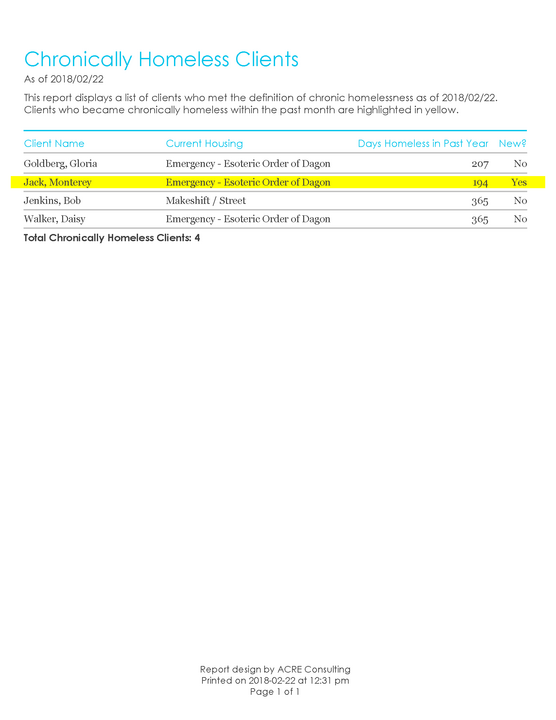
Chronic Homelessness - Sample Output
Chronically Homeless List [York]
💫Coordinated Access📍York Region📈Crystal Report

This report displays a list of all clients who are chronically homeless at the time that the report is generated, along with their total length of time homeless in the past year, and their current housing situation. Clients who are newly chronically homeless (became chronically homeless in the past year) are highlighted in yellow. Note that this report hard-codes a definition of homelessness; only particular housing types are included and it does not utilize the default rules nor does it look up a housing continuum.

This report displays a list of all clients who are chronically homeless at the time that the report is generated, along with their total length of time homeless in the past year, and their current hou…
CAD 0
Get it now
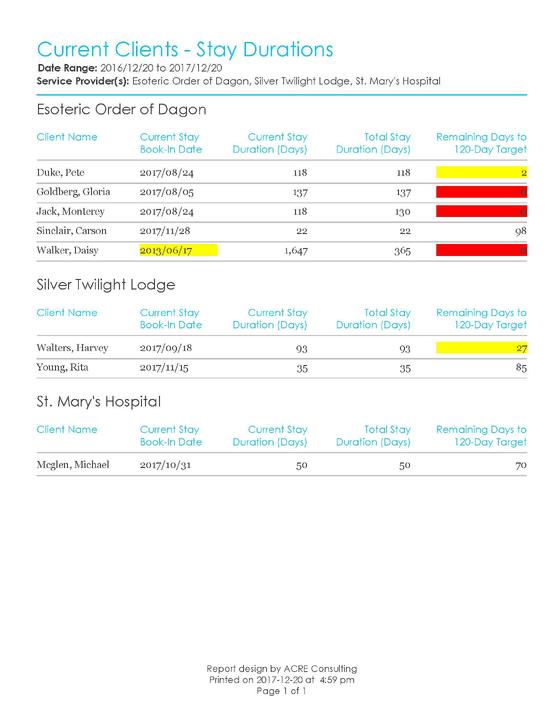
Current Clients - Stay Durations - Sample Output
Current Clients - Stay Durations
🛏️Shelter📍York Region📈Crystal Report
This report is intended for communities where there is a limit or a target maximum stay for clients in emergency shelters.  The report allows the user to specify a day limit, and the report will generate a list of all current clients as well as the time remaining to the day limit. The report lists the clients' current stay duration, as well as the total duration of all stays, during a specified time window (such as the past year). Clients approaching the target stay duration are highlighted in yellow, while clients who have reached the target stay duration are highlighted in red.
This report is intended for communities where there is a limit or a target maximum stay for clients in emergency shelters.  The report allows the user to specify a day limit, and the report will gener…
CAD 0
Get it now
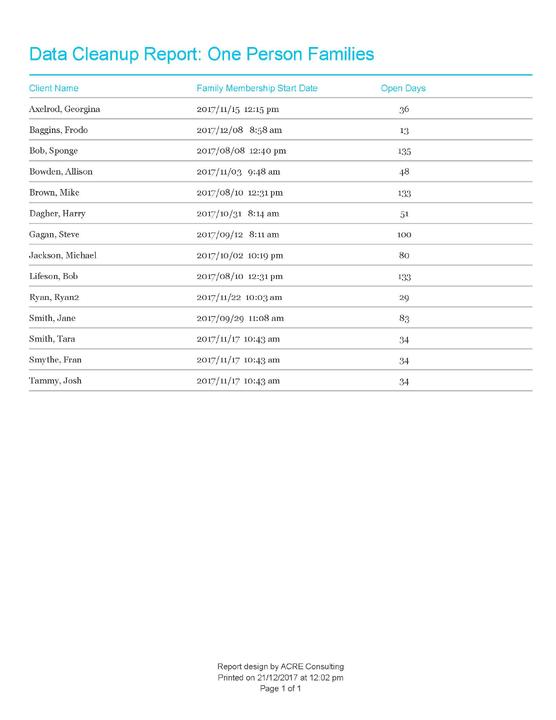
Data Cleanup - One Person Families - Sample Output
Data Cleanup Report: One-Person Families
📍York Region📈Crystal Report

This is a data quality report that identifies families comprised of a single family member.
CAD 0
Get it now
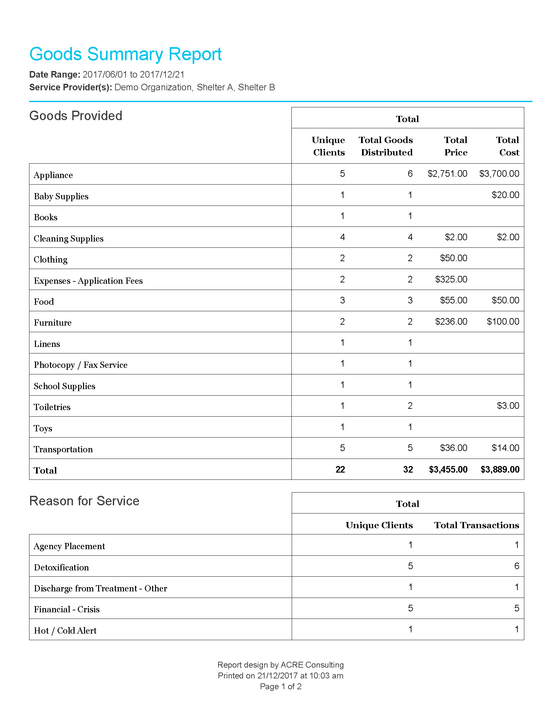
Goods Summary - Sample Output_Page_1
Goods Summary Report
🧦Day Program📍York Region📈Crystal Report

This report aggregates data for goods provided in a specified date range at specified Service Providers.
CAD 0
Get it now
Group Activities Summary - Sample Output_Page_3
Group Activities Summary
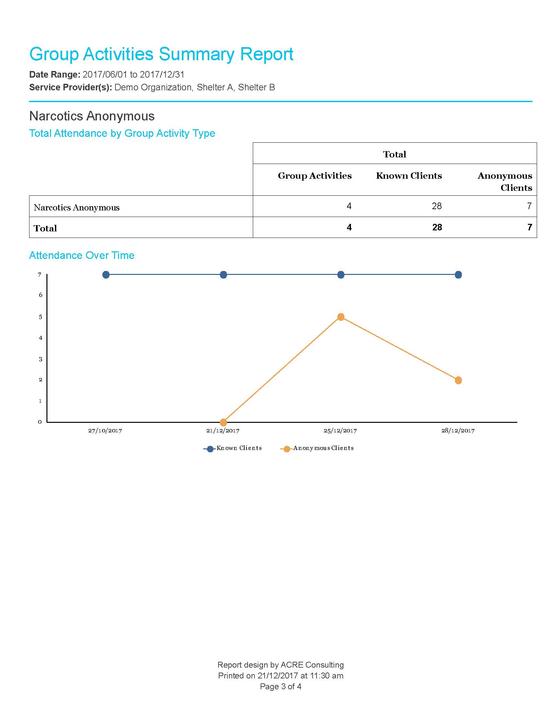
🧦Day Program📍York Region📈Crystal Report

This report aggregates data for group activities in a specified date range at specified Service Providers.  It sorts by type of group activity, and displays group activity attendance trends over time.
CAD 0
Get it now
Housing Status at Intake and Discharge - Sample Output_Page_1
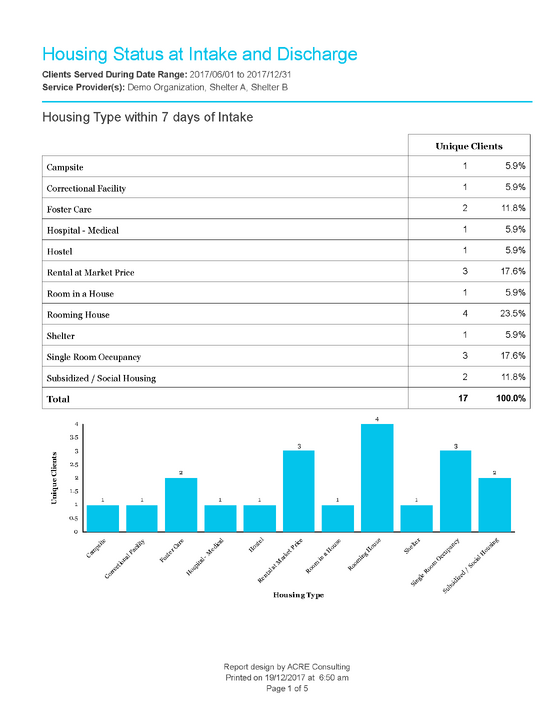
Housing Status at Intake and Discharge
🛏️Shelter📍York Region📈Crystal Report

This report aggregates information for the housing of clients before and after entering shelters. It displays housing type prior to intake, reason for service, housing type after discharge, and reason for discharge.
CAD 0
Get it now
Missing Fields - Sample Output
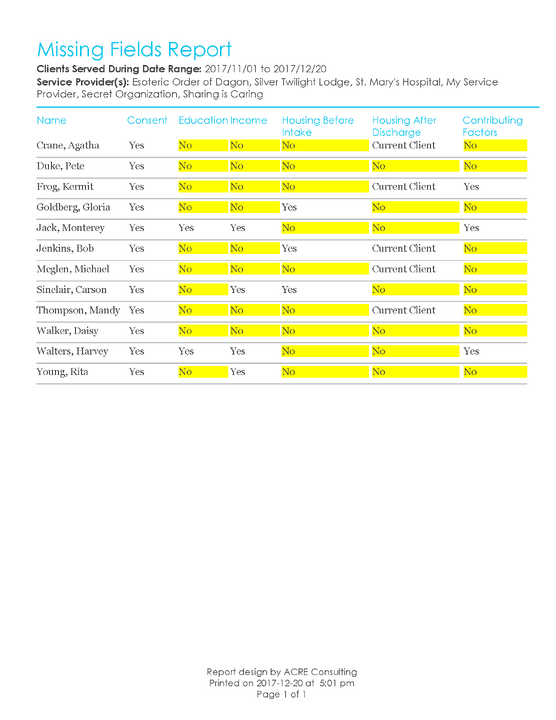
Missing Fields Report
📍York Region📈Crystal Report

This report displays a list of clients who received services within a specified date range at specified Service Providers. The report then displays mandatory modules (defined by York Region) and indicates whether the module contains any data or not.
CAD 0
Get it now
Turnaways Summary - Sample Output_Page_1
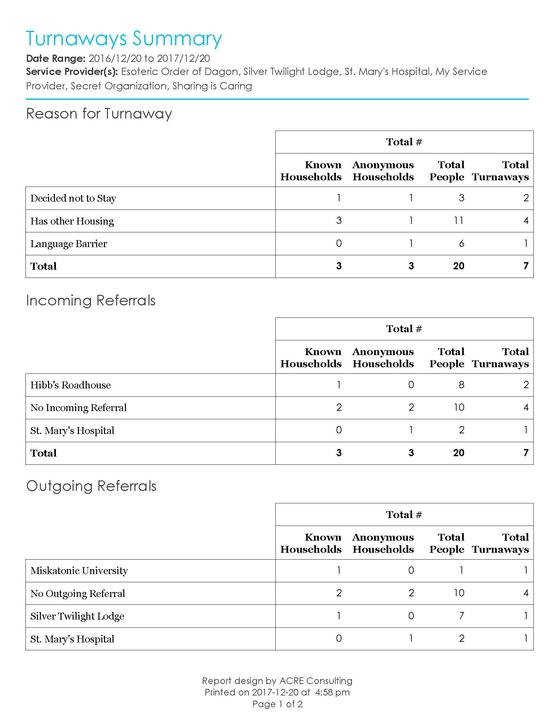
Turnaways Summary
📍York Region📈Crystal Report

This report aggregates data for turnaways in a specified date range at specified Service Providers.  It displays reason for turnaway, incoming and outgoing referrals on turnaways, and the turnaways trends, month-over-month.
CAD 0
Get it now
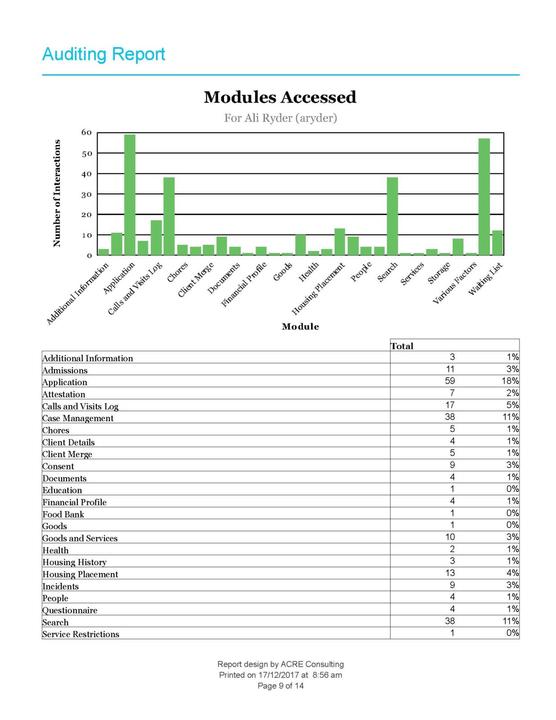
Audit-Report-Sample-Output_Page_09
York Auditing Report
📍York Region📈Crystal Report
This report allows the user to select a user and then audit that user’s actions. The report displays:
  • A summary of the user’s rights templates and what Service Providers they have access to
  • A list of all the user’s activities in a specified time period
  • A summary of the modules the user accessed, and how many times
  • A summary of the clients the user accessed, and how frequently
  • A summary of the user’s activities over time, per weekday, and per hour
This report allows the user to select a user and then audit that user’s actions. The report displays:
  • A summary of the user’s rights templates and what Service Providers they have access to
  • A lis…
CAD 0
Get it now
HIFIS 4 Logo - With Transparency HIFIS Community
Customer service
Terms and conditions
Copyright © 2026 ACRE Consulting